How Cloudflare’s Speed Brain is Giving WordPress Plugin Updates a Headache
Cloudflare rolled out this nifty feature called Speed Brain to speed up how navigation links load on your site. Sounds great, right? But, as with many tech innovations, there’s a hiccup: WordPress plugin updates have been failing because of it. Cloudflare have enabled it be default on all free Cloudflare accounts, although just because it’s enabled, doesn’t main it’s active – it’s in Beta, so this might explain why it’s happening on some sites and not others.
What’s Happening? When you switch on Speed Brain, it starts prefetching navigation links to boost your site’s loading speed. But here’s the catch: this prefetching clashes with the WordPress plugin update process. Users have found their plugins disappearing or not updating properly, which is massively painful if they didn’t test on a staging site first (even then, it’s still painful having to roll the staging site back).
What error messages might I see when attempting to update a plugin? Here are some examples that we’ve seen that have been due to this Speed Brain issue (although can be caused by other issues too):
- installation failed: could not copy file
- wordpress update failed: the package could not be installed missing file
- update failed: could not move the old version to the upgrade-temp-backup directory
- update failed: -1
Why It’s Happening: The main issue is that Speed Brain’s prefetching overlaps with how WordPress handles plugin updates. This overlap confuses up the update sequence, leading to incomplete installations or outright failures.
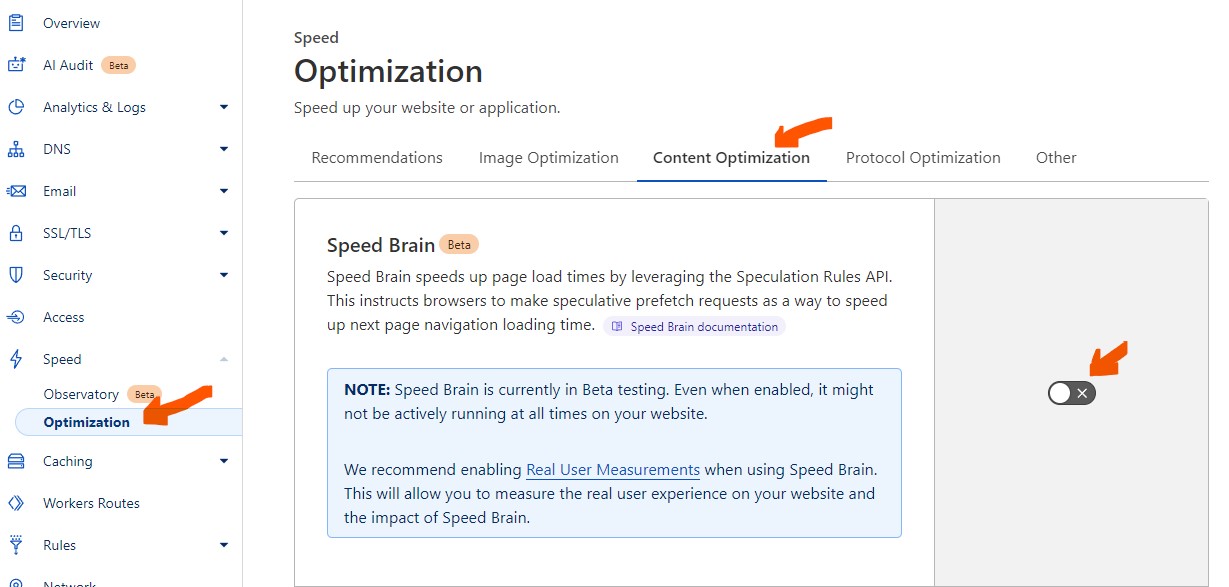
What Can You Do? Right now, the best workaround is to go into your Cloudflare dashboard and turn off Speed Brain on all domains – look in “Speed > Optimization > Content Optimization” to find the button.
Until Cloudflare sorts out a permanent fix, it’s best to keep Speed Brain off if you want your WordPress plugins to update smoothly and your site to run without any hiccups.